
뒤로
Remaining daily/game time notification
Last updated :
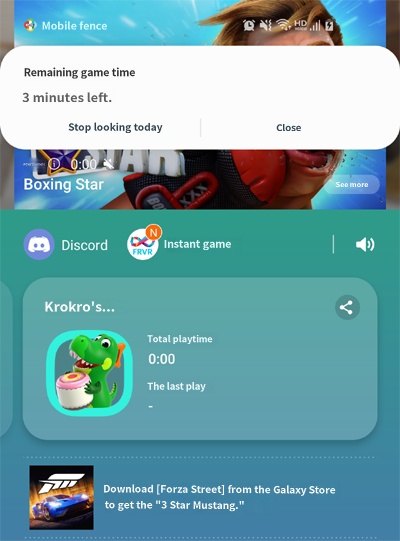
Notifications for remaining device usage time and game time are displayed as shown below 1, 2, 3, 4, 5, 10, 15, 20, and 30 minutes before the session ends.
When "Don't show again today" is clicked, notifications will no longer appear for the rest of the day, but they will reappear if any of the following conditions are met:
Device restart, date change, or changes made to daily device time or game time limits.
1. If you wish to disable remaining time notifications, please refer to the help guide below.
http://mobilefence.com/kms/50908501
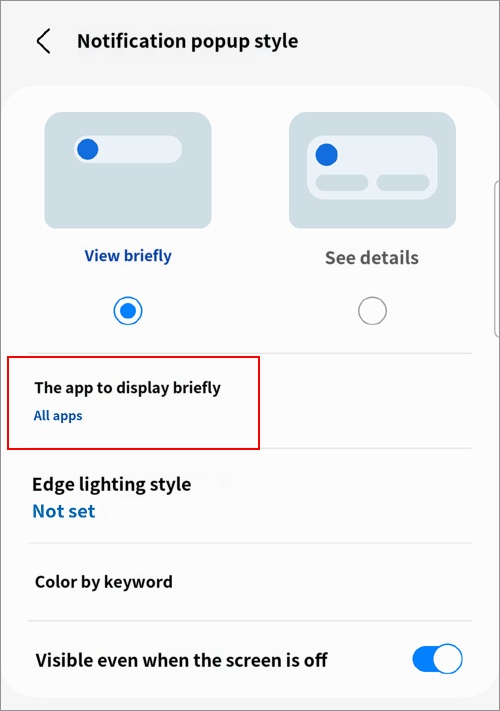
2. Starting from Android 13, notifications are displayed in 'Brief' style by default. To view the remaining time information as a popup as shown in <Figure 1>, please go to the child's device [Settings → Notifications → Apps to show briefly → Mobile Fence → Disable].
http://mobilefence.com/kms/50908501
2. Starting from Android 13, notifications are displayed in 'Brief' style by default. To view the remaining time information as a popup as shown in <Figure 1>, please go to the child's device [Settings → Notifications → Apps to show briefly → Mobile Fence → Disable].

