
EC-1

Message stating that you do not have administrative privileges when logging in  

Last updated :

When logging in on a device, you may encounter the message "You do not have management authority for this device" and be unable to proceed. This message appears when attempting to log in with an account other than the one originally connected to the device.
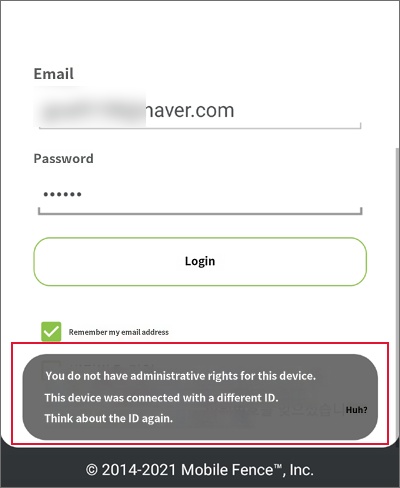


Mobile Fence requires the use of a single, shared account for both parents and children. This issue occurs when separate accounts are created for the child and the parent. You can resolve this by following the instructions below.

How to resolve issues after creating separate parent and child accounts and connecting devices


If you do not remember the credentials for the separate account used on your child's device, please contact our customer support via email at "user-support@mobilefence.com" or call us at 02-2135-6877. By providing your child's name and phone number, we can look up the account information used on the child's device.

Contact Us

Before inquiring...Have you been looking for this answer?
โ€ข How to block child disable Mobile Fence app?
โ€ข I want to know how to uninstall MobileFence app.
โ€ข Does a parentsโ€™ device get blocked?
โ€ข How to see the contents of Text?

An error has occurred while registering your question.
Your question has been successfully registered.
We will get back to you within 24 hours on weekdays. Thank you!

By providing related screens, we can process your inquiry more precisely and quickly.

Contact Us

Before inquiring...Have you been looking for this answer?
โ€ข How to block child disable Mobile Fence app?
โ€ข I want to know how to uninstall MobileFence app.
โ€ข Does a parentsโ€™ device get blocked?
โ€ข How to see the contents of Text?

An error has occurred while registering your question.
Your question has been successfully registered.
We will get back to you within 24 hours on weekdays. Thank you!

By providing related screens, we can process your inquiry more precisely and quickly.