
뒤로
Things to check when Mobile Fence notifications are not received on the parent's device
Last updated :
If you are not receiving Mobile Fence notifications on the parent device, please check the following:
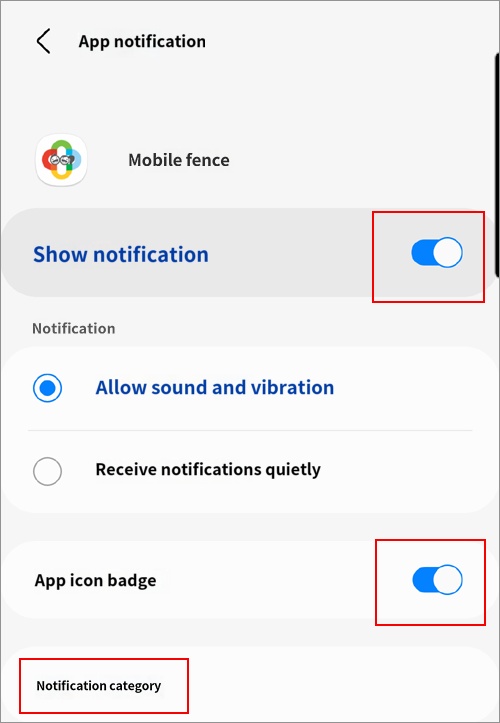
1. On the parent device, go to Settings → Applications → Mobile Fence → Notifications → Turn on all items.
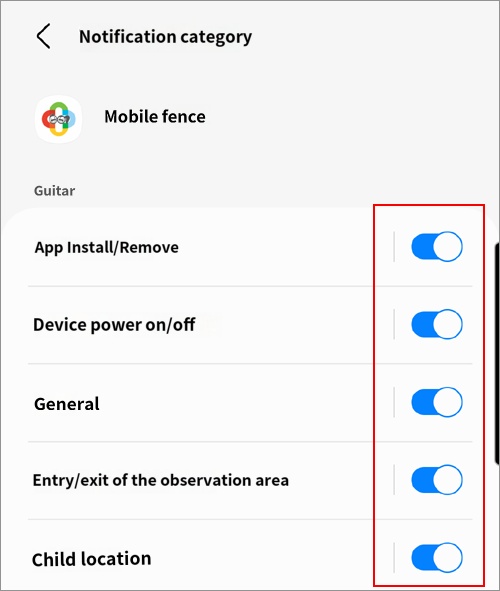
2. Notification categories → Turn on all items.
(If the notification category setting is not visible, refer to the additional information below to configure the related settings.)
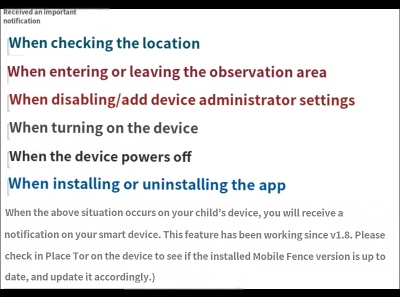
3. In the Mobile Fence app on the parent device, log in → Menu → Settings → Turn on 'Receive important notifications'.
► Additional Information
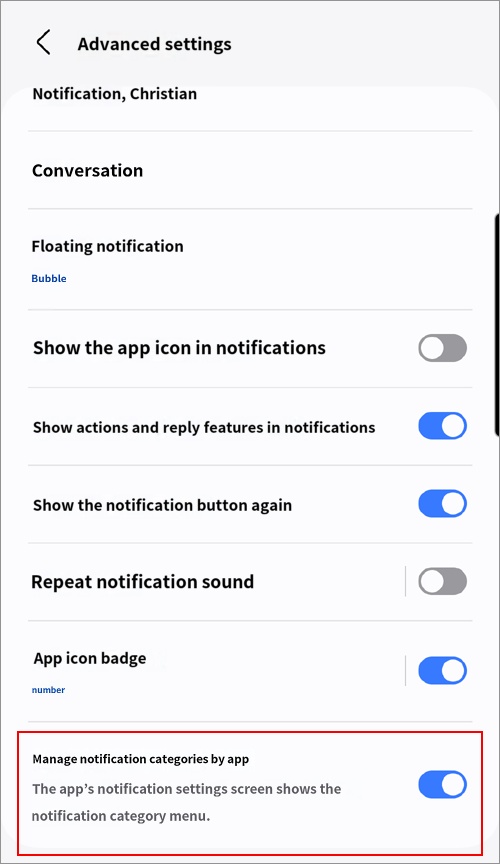
1. If the "Notification categories" setting is not visible, configure it as follows:
[Settings → Notifications → Advanced settings → Manage notification categories for each app → Turn on]
2. Location and power on/off logs are not sent as notifications to the parent device if they do not occur within 1 minute, as they are not considered significant real-time information. For example, if the device's location is tracked while both mobile data and Wi-Fi are disconnected, the location log will be recorded in the timeline when the device reconnects to the internet, but no notification will be sent.
3. The power-on notification is sent after the device is turned on and the child unlocks the lock screen. Due to the nature of Android devices, installed apps only become fully operational after the lock screen is unlocked once after a reboot. If you need to receive the notification immediately even if the child does not unlock the screen, you must disable the child device's lock screen/PIN.
• How to disable screen lock → http://mobilefence.com/kms/49957827
• Keep mobile data turned on → http://mobilefence.com/kms/86320996
1. If the "Notification categories" setting is not visible, configure it as follows:
[Settings → Notifications → Advanced settings → Manage notification categories for each app → Turn on]
2. Location and power on/off logs are not sent as notifications to the parent device if they do not occur within 1 minute, as they are not considered significant real-time information. For example, if the device's location is tracked while both mobile data and Wi-Fi are disconnected, the location log will be recorded in the timeline when the device reconnects to the internet, but no notification will be sent.
3. The power-on notification is sent after the device is turned on and the child unlocks the lock screen. Due to the nature of Android devices, installed apps only become fully operational after the lock screen is unlocked once after a reboot. If you need to receive the notification immediately even if the child does not unlock the screen, you must disable the child device's lock screen/PIN.
• How to disable screen lock → http://mobilefence.com/kms/49957827
• Keep mobile data turned on → http://mobilefence.com/kms/86320996
► Related Topics

