
EC-1

Do I need to keep Mobile Fence installed on the parent's smartphone as well?  

Last updated :

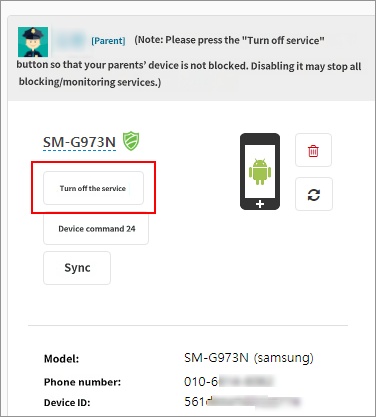
The Mobile Fence app is not divided into separate child and parent versions. When you log in to the Mobile Fence app with a parent account, features for managing your child are provided. While the same features are available on the www.mobilefence.com website, keeping the Mobile Fence app installed allows you to use functions such as location tracking in case of a lost smartphone, remote device reset, and screen locking, which can be very useful in emergency situations.

Therefore, it is recommended to keep the app on the parent's smartphone to take advantage of these benefits while disabling the blocking/monitoring service. Pressing the deactivate button in the Smart Device menu will stop only the blocking/monitoring service.

Contact Us

Before inquiring...Have you been looking for this answer?
โ€ข How to block child disable Mobile Fence app?
โ€ข I want to know how to uninstall MobileFence app.
โ€ข Does a parentsโ€™ device get blocked?
โ€ข How to see the contents of Text?

An error has occurred while registering your question.
Your question has been successfully registered.
We will get back to you within 24 hours on weekdays. Thank you!

By providing related screens, we can process your inquiry more precisely and quickly.

Contact Us

Before inquiring...Have you been looking for this answer?
โ€ข How to block child disable Mobile Fence app?
โ€ข I want to know how to uninstall MobileFence app.
โ€ข Does a parentsโ€™ device get blocked?
โ€ข How to see the contents of Text?

An error has occurred while registering your question.
Your question has been successfully registered.
We will get back to you within 24 hours on weekdays. Thank you!

By providing related screens, we can process your inquiry more precisely and quickly.