
What is Sleep mode?
Starting with Android 6.0 (API level 23), Android has introduced two power-saving features. These allow users to manage how apps behave when the device is not connected to a power source, thereby extending battery life. Doze mode reduces battery consumption by deferring background CPU and network activity for apps when the device is not in use for an extended period. App Standby defers background network activity for apps with which the user has not recently interacted.
When the device is not plugged into a charger, the screen is off, and the device remains stationary for a certain period, it enters Doze mode. In Doze mode, the system attempts to save battery by restricting app access to network and CPU-intensive services. Additionally, apps are prevented from accessing location and network services.
The system periodically exits Doze mode for short intervals to allow apps to complete deferred activities. At this point, deferred Mobile Fence location tracking tasks are also attempted. However, during this maintenance window, accurate location tracking via GPS cannot be performed to conserve battery, and the system returns the last known location of the device.
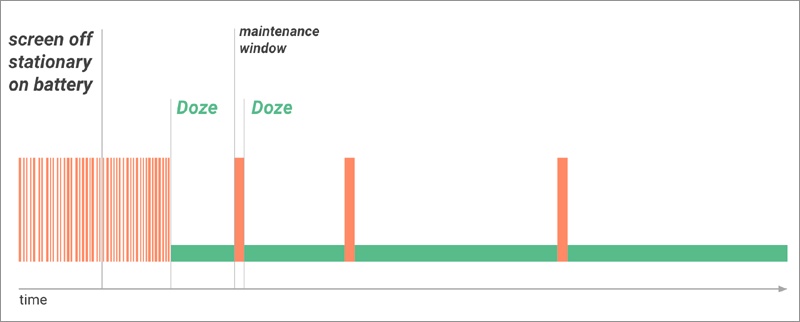
Once each maintenance window ends, the system re-enters Doze mode, suspending network access and deferring jobs, syncs, and alarms. As time passes, the system reduces the frequency of these maintenance windows. This is because, if the device remains inactive for a long period without being connected to a charger, it further reduces battery consumption.
- The device screen is turned on, and if there is a lock screen, the device is unlocked.
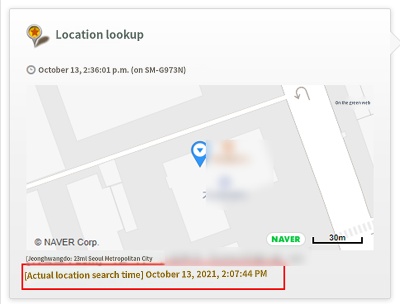
When a location search is performed while the device is in Doze mode, the last known location is retrieved, and in the timeline log, the "Actual Location Search Time" entry is characteristically shown repeatedly in the location logs.
► Related Items

