
Safe mode blocked
"Safe Mode" is a mode designed to resolve issues by loading only basic system apps when a problem occurs while using a smart device. In this mode, user-installed apps, including Mobile Fence, do not load. Therefore, a child can access device settings without restrictions, disable permissions required for Mobile Fence to function, or uninstall the Mobile Fence app itself.
The method to block entry into Safe Mode is as follows. Since this feature cannot be configured remotely, you must have the child's device in hand and perform the settings directly on the device.
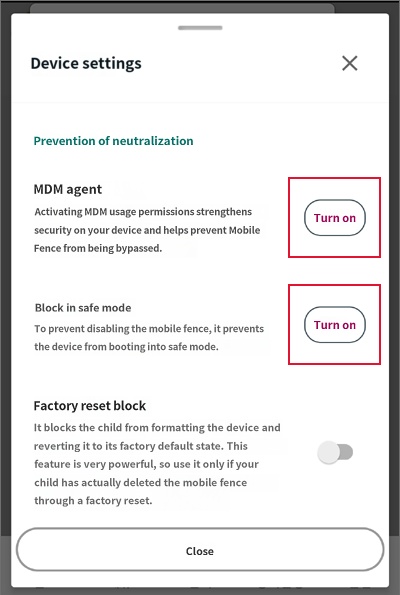
2) Device Settings → MDM Agent → Click 'Turn On'
3) Safe Mode Block → Click 'Turn On'
1) Run the Mobile Fence app on the child's device → Click the Parent Mode button → Log in
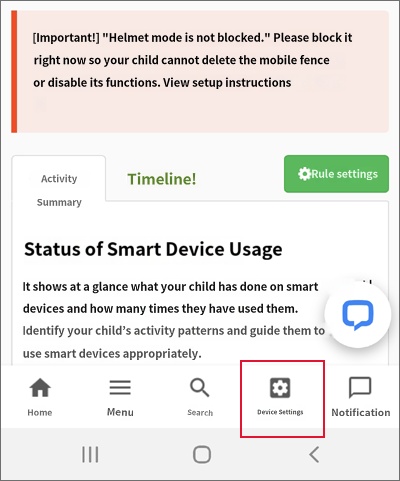
2) Device Settings → MDM Agent → Click 'Turn On'
3) Safe Mode Block → Click 'Turn On'
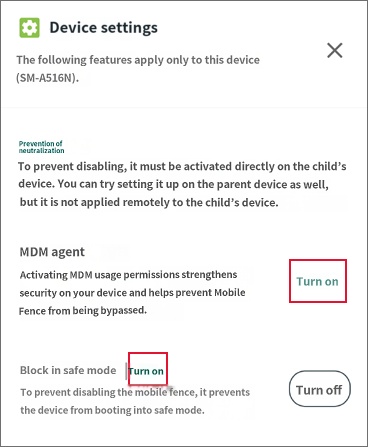
Some Samsung devices do not support the technology called Knox, making it impossible to configure the Safe Mode Block. Please refer to the following link for a list of devices that support Knox.
https://www.samsungknox.com/ko/knox-platform/supported-devices

