
EC-1

Can website access also be restricted?  

Last updated :

Mobile Fence manages information on millions of websites worldwide in its database. You can block access to entire categories of adult websites or specify particular websites to be blocked.
 

1) Blocking Entire Web Categories


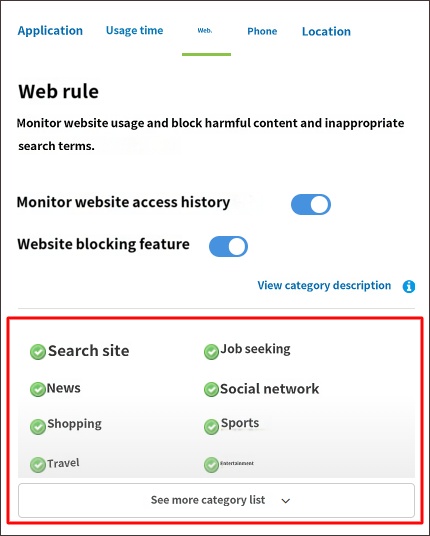
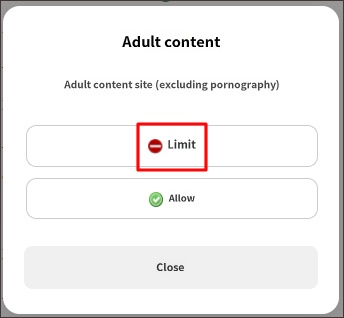
You can block entire categories of websites, such as adult, nudity, chat, gaming, or violence.

1. Access Parent Mode and click the "Rule Settings" button.
2. Under the <Web> tab, select the category you wish to block and click "Restrict."


2) Blocking Access to Specific Websites


1. Access Parent Mode and click the "Rule Settings" button.
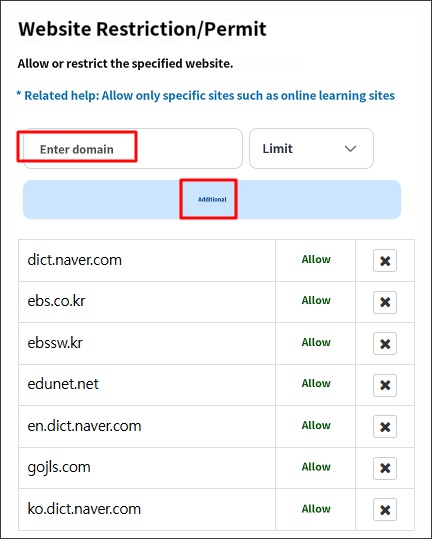
2. Under the <Web> tab, enter the website address you wish to block and click the "Add" button.


• Related Topics

- Blocking browsers other than Chrome

How to block internal internet access in KakaoTalk

Contact Us

Before inquiring...Have you been looking for this answer?
โ€ข How to block child disable Mobile Fence app?
โ€ข I want to know how to uninstall MobileFence app.
โ€ข Does a parentsโ€™ device get blocked?
โ€ข How to see the contents of Text?

An error has occurred while registering your question.
Your question has been successfully registered.
We will get back to you within 24 hours on weekdays. Thank you!

By providing related screens, we can process your inquiry more precisely and quickly.

Contact Us

Before inquiring...Have you been looking for this answer?
โ€ข How to block child disable Mobile Fence app?
โ€ข I want to know how to uninstall MobileFence app.
โ€ข Does a parentsโ€™ device get blocked?
โ€ข How to see the contents of Text?

An error has occurred while registering your question.
Your question has been successfully registered.
We will get back to you within 24 hours on weekdays. Thank you!

By providing related screens, we can process your inquiry more precisely and quickly.