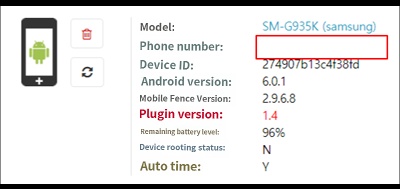
If the phone number is not visible even though the SIM card is inserted into the device.
If the phone number is not visible in the smart device menu even though a USIM is inserted, it may be due to one of the following cases.
1. Plugin Not Installed
The plugin handles call and text message-related functions. If it is not installed, the phone number will not be displayed, and it will be impossible to monitor call and text message history. Please refer to here for instructions on how to install the plugin.
2. Plugin Permission Error
If the plugin is installed but its permissions (com.mobilefence.family.plugin) have been disabled for any reason, please take the following steps.
View Plugin Permission Check and Restart Guide
3. Dual SIM Devices
In Europe, many people travel across borders, so there are devices that can accommodate two USIMs. These devices have a characteristic where the phone number may not be displayed. While call and text monitoring functions are generally understood to work normally, they may not function as expected due to the nature of Dual SIM devices. If call and text records are visible in the timeline but the phone number field is empty when viewing device information in the smart device menu, it can be considered a Dual SIM device.