
Monitoring the list of videos watched on YouTube
While it is impossible to monitor which videos are watched within the YouTube app, the same goal can be achieved using the website monitoring feature.
The internet browsing history and content control features provided by Mobile Fence are only available in the 'Chrome browser'; activity history cannot be monitored in the activity timeline when using other apps.
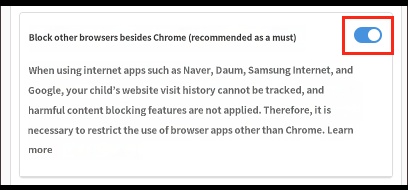
By using the 'Block non-Chrome browsers' feature, if your child attempts to run other internet apps (Naver, Daum, Samsung Internet), those apps will be automatically terminated. Consequently, if your child wants to use the internet on their device, they must use the Chrome browser, which allows you to check your child's website search and access history.
After configuring the settings as follows, please have them access the YouTube website (youtube.com) through the Chrome browser.
1. Rules → Application → Application Rules → View Default Device Apps → Block YouTube app execution
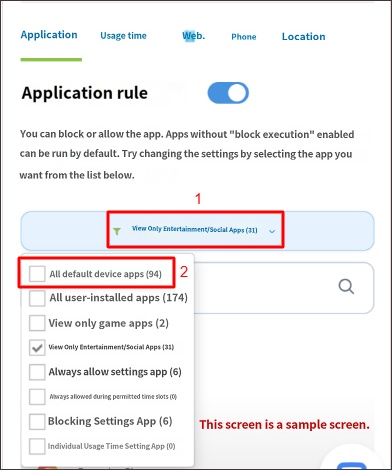
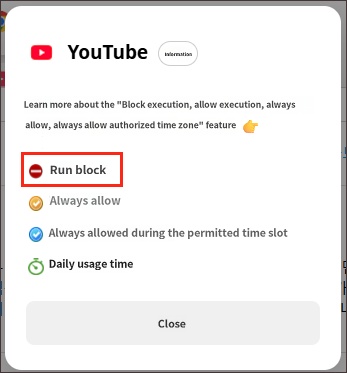
2. Rules → Web → Turn on 'Block non-Chrome browsers'
3. Launch the Chrome browser on the child's device → Enter youtube.com in the 'address bar' and navigate to use YouTube.
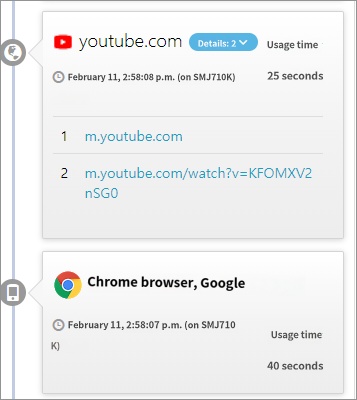
4. You can check the detailed URLs in the timeline as shown below.
► Related Topics

