뒤로
Complete YouTube block
Last updated :
To completely block your child's access to YouTube, you must follow the steps below in order.
1. Rule Settings → Applications → All Default Apps → Block 'YouTube' app execution
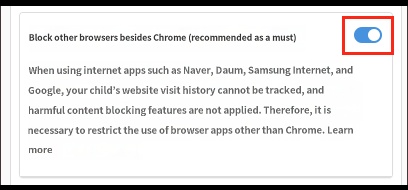
2. Rule Settings → Web → Turn on 'Block browsers other than Chrome'
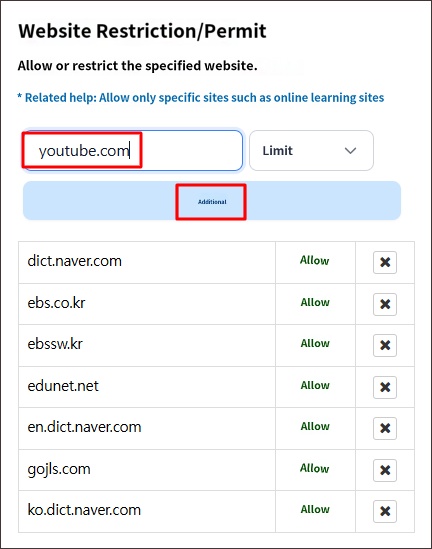
3. Rule Settings → Web → Add the site address to 'Restricted Websites' in 'Website Restriction/Allowance'
2. Rule Settings → Web → Turn on 'Block browsers other than Chrome'
3. Rule Settings → Web → Add the site address to 'Restricted Websites' in 'Website Restriction/Allowance'
1. Rule Settings → Applications → All Default Apps → Block 'YouTube' app execution
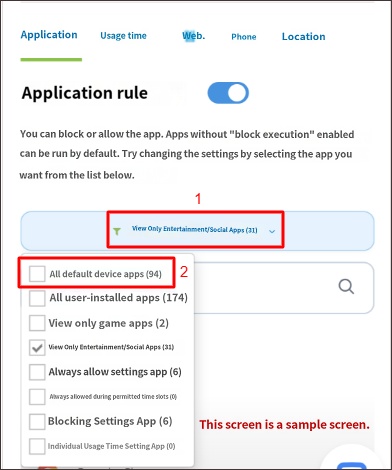
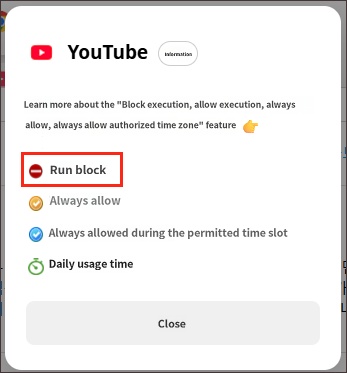
2. Rule Settings → Web → "Block browsers other than Chrome" → Turn on
Mobile Fence can only monitor and block activities within the Google "Chrome Browser." You must enable the "Block browsers other than Chrome" feature to prevent your child from accessing youtube.com through other browsers such as Naver or Samsung Internet.
3. Rule Settings → Web → In 'Website Restriction/Allowance', enter the site address and add www.youtube.com as a restricted site.