
뒤로
Allow specific websites only
Last updated :
The method to block all websites and allow only specific addresses is as follows:
Go to the Web tab in the child's rule settings
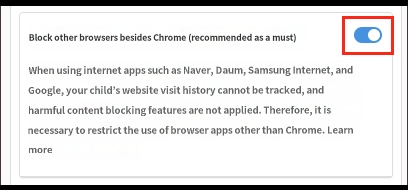
1) Block browsers other than Chrome → On
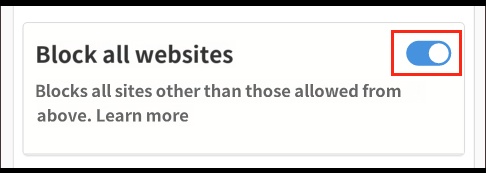
2) Block all websites → On
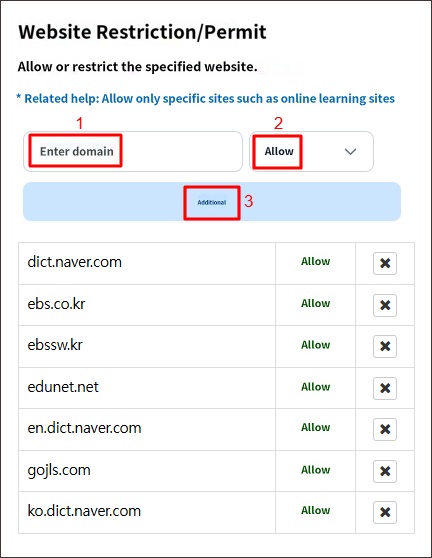
3) In "Restrict/Allow Websites," enter the website address you wish to allow → Select "Allow" → Click the "Add" button
1) Block browsers other than Chrome → On
2) Block all websites → On
3) In "Restrict/Allow Websites," enter the website address you wish to allow → Select "Allow" → Click the "Add" button
1) 'Block browsers other than Chrome' On
2) 'Block all websites' On
3) Add the website address to allow
5) Instruct the child to launch the Chrome browser to use the allowed sites above.
Only domain addresses can be registered for restriction/allowance. Registering paths that follow the domain after a slash (/) is not supported.
• Possible : youtube.com
• Impossible : youtube.com/watch?v=8dzNYvcSeTI
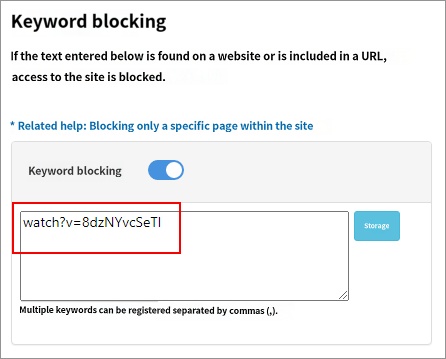
If you wish to block paths after the domain, you can use the "Keyword Blocking" feature to register "watch?v=8dzNYvcSeTI" as a blocking keyword.
• Possible : youtube.com
• Impossible : youtube.com/watch?v=8dzNYvcSeTI
If you wish to block paths after the domain, you can use the "Keyword Blocking" feature to register "watch?v=8dzNYvcSeTI" as a blocking keyword.
► Related Topics

