
Characteristics of apps set to "Always allow"
Apps set to "Always Allow" are exceptions that are not restricted under any conditions, and therefore have the following characteristics:
1. These apps can be used without limitation, exceeding the "Daily Device Usage Time."
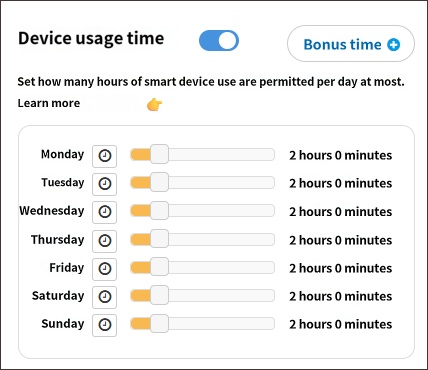
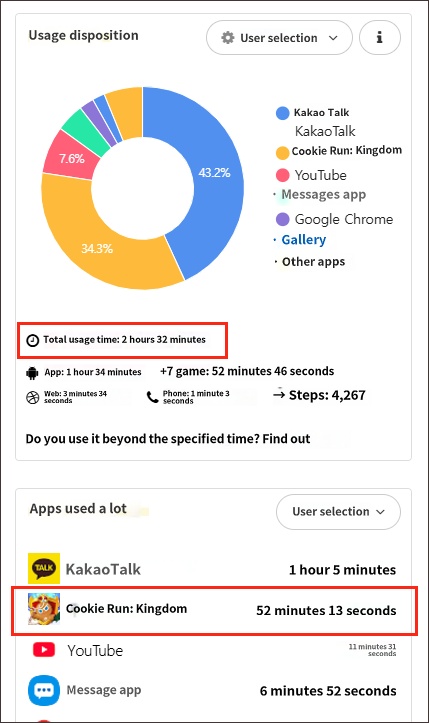
For example, if you set the "Device Usage Time" to 2 hours per day (Figure 1) and set a specific app to "Always Allow," device usage will not be blocked when the child has used the device for 2 hours. Instead, only the "Always Allow" app will remain accessible. You can understand "Always Allow" as "No Restrictions." Additionally, when viewing statistics, as shown in "Figure 2," the app usage time will exceed 2 hours because the usage time of the 'unrestricted' game app is added to the total.
2. They can be executed even during "Restricted Time Periods."
Apps set to "Always Allow" can be executed even during the "Restricted Time Period."
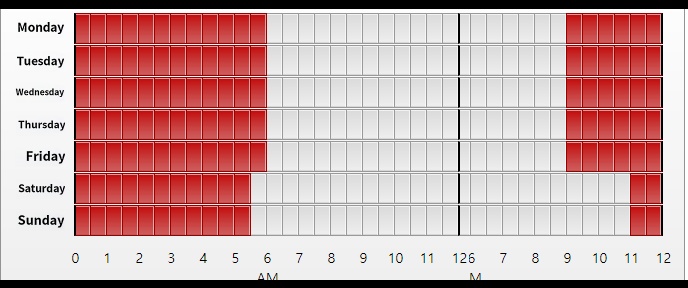
If you want to allow a specific app to be used almost without time limits but prevent it from being used during the "Restricted Time Period," you can use the "Individual App Usage Time" feature to grant a sufficient amount of time, such as 10 hours, to that app. By doing this, the app can be used almost without restriction during the "Allowed Time Period" and will be blocked during the "Restricted Time Period." However, this is not a recommended setting as it may cause confusion when calculating time in usage statistics.
Exceptions to "Always Allow"
1) When the "Block Settings" feature is enabled, task killer apps that could potentially neutralize Mobile Fence are automatically blocked as well. These apps include antivirus or battery optimization apps like ALYac, V3, or Greenify. Even if these apps are set to "Always Allow," the system is designed to override this and block them when "Block Settings" is on. This is because allowing these apps would create a loophole that could be used to neutralize Mobile Fence.
2) If the device is blocked by the "Block All When Offline" feature, apps set to "Always Allow" will also be blocked. This is intended to encourage the child to turn on the internet, upholding the purpose of the feature.

