EC-2

Settings blocked  

Last updated :

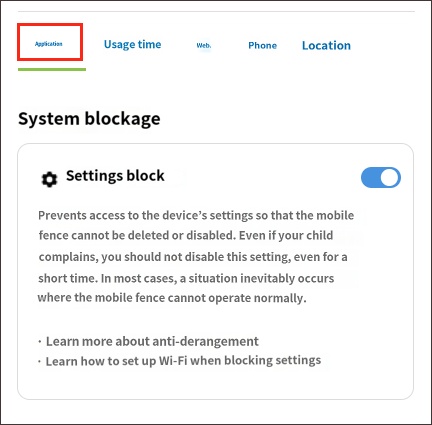
Blocking Settings


If access to Settings is left open, your child can stop the Mobile Fence service or revoke the permissions required for it to function properly at any time. In other words, the child can turn Mobile Fence on and off at will to bypass parental control, making it difficult for you to notice.


If you do not block the Settings menu, issues such as "abnormal monitoring, failure to locate the device, exceeding time limits, permission revocation, and app uninstallation" may occur.


To enable "Block Settings," follow the steps below:
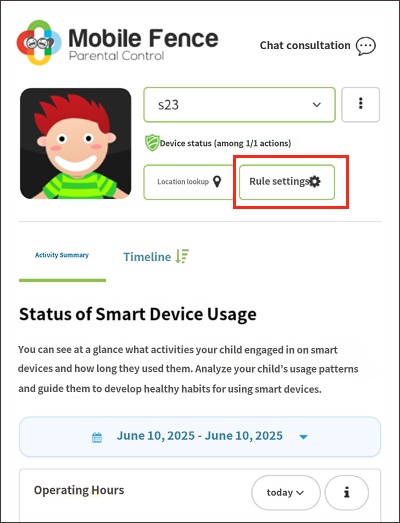
 

Rules → Apps → System Blocking → Block Settings → On


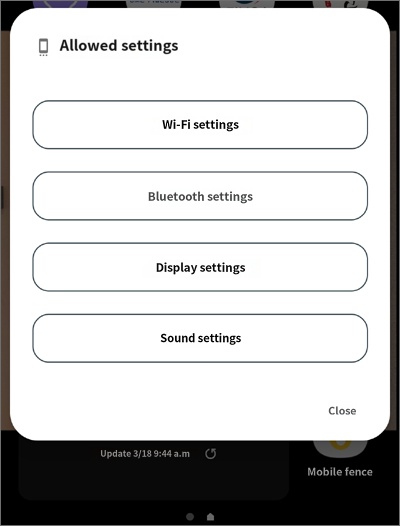
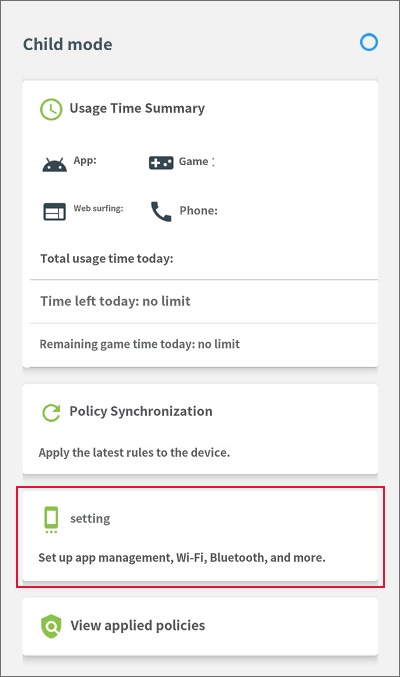
Note that even when Settings are blocked, we provide an option to access the Wi-Fi settings menu from the child mode screen when the Mobile Fence app is launched on the child's device.

Please encourage your child to use the menu provided within the Mobile Fence app on their device instead of accessing the system settings menu.


(This will be displayed when launching the Mobile Fence app on the child's device.)


• Related item: Anti-Tamper Settings

Contact Us

Before inquiring...Have you been looking for this answer?
โ€ข How to block child disable Mobile Fence app?
โ€ข I want to know how to uninstall MobileFence app.
โ€ข Does a parentsโ€™ device get blocked?
โ€ข How to see the contents of Text?

An error has occurred while registering your question.
Your question has been successfully registered.
We will get back to you within 24 hours on weekdays. Thank you!

By providing related screens, we can process your inquiry more precisely and quickly.

Contact Us

Before inquiring...Have you been looking for this answer?
โ€ข How to block child disable Mobile Fence app?
โ€ข I want to know how to uninstall MobileFence app.
โ€ข Does a parentsโ€™ device get blocked?
โ€ข How to see the contents of Text?

An error has occurred while registering your question.
Your question has been successfully registered.
We will get back to you within 24 hours on weekdays. Thank you!

By providing related screens, we can process your inquiry more precisely and quickly.