EC-1

Disable Xiaomi Dual Apps  

Last updated :

Dual Apps allow you to install two of the same application on your phone, enabling them to operate independently with different accounts.

When this feature is used, activity on dual messengers is not monitored by Mobile Fence, allowing children to use them without restriction.


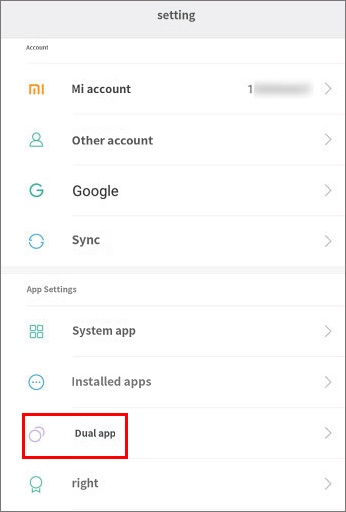
This feature can be controlled from the 'Settings' menu on the child's device.


1. Child's device Settings → Dual Apps


2. Turn off the Dual Apps feature for all applications.

Turning off the Dual Apps feature will delete existing dual apps.


After completing the settings above, be sure to turn on the 'Block Settings' feature to prevent your child from re-enabling the Dual Apps feature through the Settings app.


Log in to Mobile Fence on the parent's device → Click Child Monitoring/Rule Settings → Application → System Block → Turn on Block Settings

Contact Us

Before inquiring...Have you been looking for this answer?
โ€ข How to block child disable Mobile Fence app?
โ€ข I want to know how to uninstall MobileFence app.
โ€ข Does a parentsโ€™ device get blocked?
โ€ข How to see the contents of Text?

An error has occurred while registering your question.
Your question has been successfully registered.
We will get back to you within 24 hours on weekdays. Thank you!

By providing related screens, we can process your inquiry more precisely and quickly.

Contact Us

Before inquiring...Have you been looking for this answer?
โ€ข How to block child disable Mobile Fence app?
โ€ข I want to know how to uninstall MobileFence app.
โ€ข Does a parentsโ€™ device get blocked?
โ€ข How to see the contents of Text?

An error has occurred while registering your question.
Your question has been successfully registered.
We will get back to you within 24 hours on weekdays. Thank you!

By providing related screens, we can process your inquiry more precisely and quickly.