
EC-2

Exclude Mobile Fence from LG Power Saving Target  

Last updated :

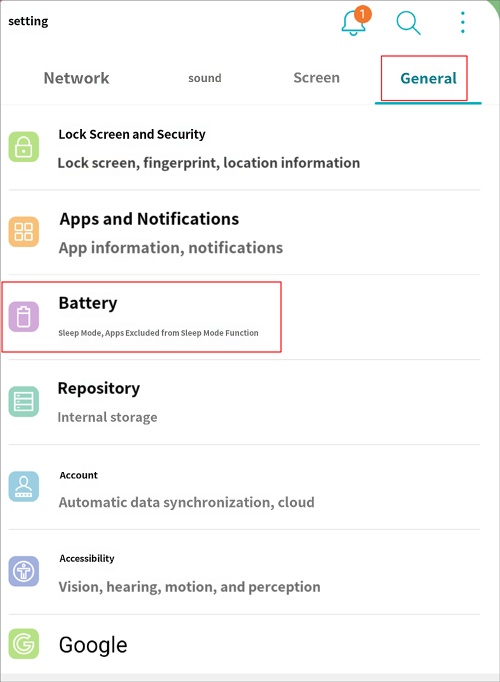
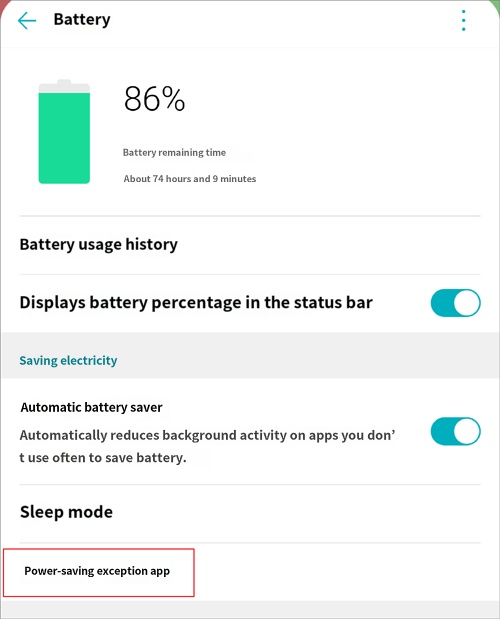
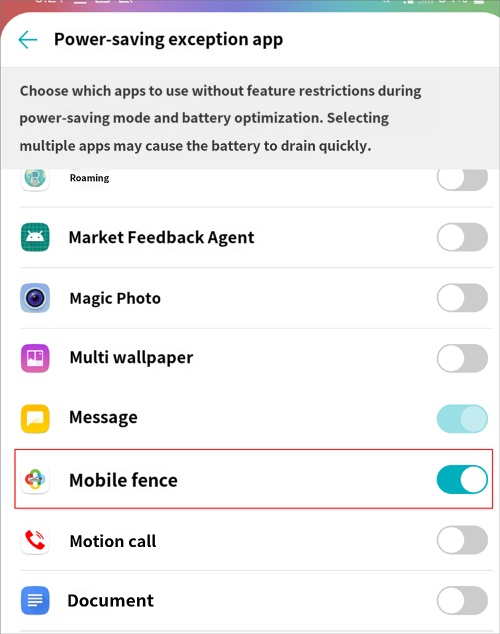
If the Mobile Fence app is set to power-saving mode on the child's device, monitoring and location tracking services may not function properly. Please follow the guide below to set the Mobile Fence app to 'Non-optimized apps'.


1. On the child's device, go to Settings → General → Battery


2. Click on 'Apps that are not optimized'.


3. Turn on the switch for Mobile Fence.
 

Contact Us

Before inquiring...Have you been looking for this answer?
โ€ข How to block child disable Mobile Fence app?
โ€ข I want to know how to uninstall MobileFence app.
โ€ข Does a parentsโ€™ device get blocked?
โ€ข How to see the contents of Text?

An error has occurred while registering your question.
Your question has been successfully registered.
We will get back to you within 24 hours on weekdays. Thank you!

By providing related screens, we can process your inquiry more precisely and quickly.

Contact Us

Before inquiring...Have you been looking for this answer?
โ€ข How to block child disable Mobile Fence app?
โ€ข I want to know how to uninstall MobileFence app.
โ€ข Does a parentsโ€™ device get blocked?
โ€ข How to see the contents of Text?

An error has occurred while registering your question.
Your question has been successfully registered.
We will get back to you within 24 hours on weekdays. Thank you!

By providing related screens, we can process your inquiry more precisely and quickly.